Day 01 — CPU vs GPU, and the CUDA Programming Model
Why GPU cores are small and many while CPU cores are big and few, why Gen AI needs GPUs, and what host, device, kernels, and threads actually mean.
CPU vs GPU
We can think of the CPU as the main chef handling and assigning tasks to his helpers to solve a big problem. The chef is good at assigning tasks and doing the complex work himself — but when it comes to smaller repetitive tasks, like cutting onions or kneading bread, you don't assign the main chef to do that. Instead the smaller helpers, who are large in number, do that. Those helpers are the GPU cores.
Now let's move towards CPU and GPU cores and try to understand why a CPU can't do parallel tasks the way a GPU does.
I'd like to go deep into the transistors. When it comes to computation inside computing devices, it's just 1s and 0s — and those are actually transistors turning on and off billions of times in a single second. The "cores" we read about on processors are nothing but bunches of transistors.
CPU cores are much bigger than GPU cores, which means a single CPU core has more computational power (a larger number of transistors) than a single GPU core does. But the number of cores inside a GPU is much larger than the number of CPU cores — which in turn gives the GPU a larger number of transistors overall.
- 1 CPU core — built from a huge number of transistors, because it needs to do complex things: branch prediction, out-of-order execution, big caches, sophisticated control logic. Think of it like a mansion: way more bricks per house.
- 1 GPU core — built from a much smaller number of transistors, because it's stripped down. It just does simple repetitive math with minimal decision-making ability. Think of it like a small hut: far fewer bricks per house.
Transistor count isn't a clean rule for differentiating a GPU from a CPU, but it still helps intuitively.
Why does Gen AI require GPUs?
We know backpropagation and matrix operations are tons of operations that need to be done in parallel — otherwise it would take far too much time on a CPU. A CPU can handle some parallelism, but when it comes to very large parallel computation, the GPU comes forward and does that job.
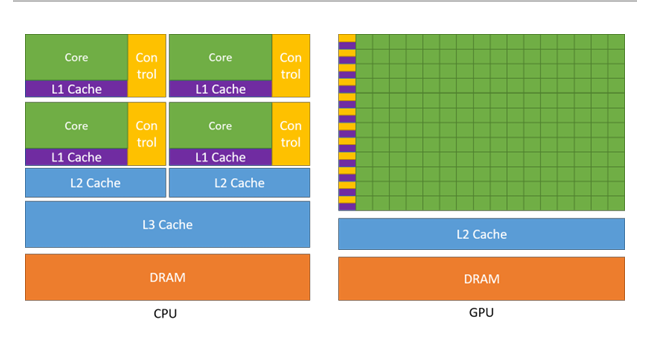
GPUs are specialized for highly parallel computations and devote more transistors to data processing units, while CPUs dedicate more transistors to data caching and flow control.
What that statement means: GPUs use almost all of their transistor budget to build tons of simple workers that all crunch numbers in parallel. CPUs use a lot of their transistor budget instead on making each of their few workers smarter and faster at handling one complex task at a time — giving each its own big notepad and its own decision-making manager.
The green boxes are the cores. The GPU's whole strategy is "pack in as many simple cores as possible." That's why the GPU diagram is almost all green (cores/workers) with barely any yellow (control) or blue (cache), while the CPU diagram has a much more even mix — a CPU spreads its transistors across many different jobs, not just raw worker count.
The CUDA Programming Model
Heterogeneous system
- CUDA assumes a heterogeneous system — the system has both a CPU and a GPU.
- The CPU and the memory directly connected to it are called the host and host memory.
- The GPU and the memory directly connected to it are called the device and device memory.
GPU programming execution workflow
The CUDA programming model assumes a heterogeneous computing system, which means a system that includes both GPUs and CPUs. The CPU and the memory directly connected to it are called the host and host memory, respectively. A GPU and the memory directly connected to it are referred to as the device and device memory, respectively. In some system-on-chip (SoC) systems, these may be part of a single package. In larger systems, there may be multiple CPUs or GPUs. CUDA applications execute some part of their code on the GPU, but applications always start execution on the CPU. The host code, which is the code that runs on the CPU, can use CUDA APIs to copy data between the host memory and device memory, start code executing on the GPU, and wait for data copies or GPU code to complete. The CPU and GPU can both be executing code simultaneously, and best performance is usually found by maximizing utilization of both CPUs and GPUs.
— NVIDIA CUDA C++ Programming Guide
My understanding of that paragraph:
For CUDA programming we need both the CPU and the GPU. The CUDA programming model is for optimizing GPU utilization — so what's the need for the CPU? A CUDA application always starts from the CPU, and the CPU controls what gets sent to the GPU for parallel computing (the heavily computational operations). The host and the device each have their own memory, so to move work from the CPU to the GPU, data is copied from host memory to device memory via CUDA APIs. When the GPU is done with its computation, the results are moved back to the CPU.
Breaking it down, sentence by sentence
Think of it like a manager and a warehouse crew:
- CPU — the manager. Every workday (every program) always starts with the manager. There's no version where the crew starts working before the manager shows up and gives instructions.
- GPU — a huge crew of workers who are amazing at simple repetitive tasks in bulk, but who can't start on their own. They wait for the manager to hand them a job.
"CUDA applications execute some part of their code on the GPU, but applications always start execution on the CPU."
Every program boots up and starts running on the CPU first. Only specific parts of the program — the parts that benefit from massive parallelism, like processing millions of pixels or matrix elements — get handed off to the GPU. The rest keeps running normally on the CPU. The manager always starts the workday; only some tasks get delegated to the crew.
"The host code, which is the code that runs on the CPU, can use CUDA APIs..."
"Host" is just the technical name for the CPU side of the program. "CUDA APIs" are a toolkit of pre-built commands the programmer can call — like a walkie-talkie the manager uses to talk to the crew.
"...to copy data between the host memory and device memory..."
The CPU and GPU each have their own separate memory — like the manager's office having its own filing cabinet, and the warehouse having a separate one. Before the GPU can work on data, that data has to physically be copied from CPU memory to GPU memory.
"...start code executing on the GPU..."
Once the data has arrived in GPU memory, the CPU tells the GPU "go, start crunching." The manager saying: here's the job, get to it.
"...and wait for data copies or GPU code to complete."
Copying data takes time, and the GPU doing its job takes time. The CPU often has to pause and wait until those are done before it can use the results — like the manager waiting for a delivery truck, or waiting for the crew to finish before moving to the next step.
"The CPU and GPU can both be executing code simultaneously..."
Important nuance: the CPU doesn't have to sit idle the whole time. While the GPU crunches its parallel job, the CPU can keep doing other useful work — like the manager handling paperwork while the crew works, instead of standing there watching.
"...and best performance is usually found by maximizing utilization of both CPUs and GPUs."
The whole point: you get the best performance when neither the manager nor the crew is idle. If the CPU just waits every time it hands off a job, you're wasting it. Good CUDA programs overlap CPU work and GPU work so both stay busy.
The flow, put together
- Program starts → CPU is running.
- CPU decides "this chunk of data needs GPU-style parallel crunching."
- CPU copies that data from host memory to device memory.
- CPU tells the GPU to go.
- While the GPU works, the CPU can do other unrelated work — not just idle.
- Eventually the CPU waits for the GPU to finish, grabs the results, and continues the program.
Kernels and threads
The code an application executes on the GPU is referred to as device code, and a function that is invoked for execution on the GPU is, for historical reasons, called a kernel. The act of starting a kernel running is called launching the kernel. A kernel launch can be thought of as starting many threads executing the kernel code in parallel on the GPU. GPU threads operate similarly to threads on CPUs, though there are some differences important to both correctness and performance that will be covered in later sections.
— NVIDIA CUDA C++ Programming Guide
"The code an application executes on the GPU is referred to as device code..."
GPU = "device," so code that runs on the GPU is device code. Same idea for host code = code that runs on the CPU. It's just naming which side of the system runs which chunk.
"...and a function that is invoked for execution on the GPU is, for historical reasons, called a kernel."
A specific function you write that's meant to run on the GPU is called a kernel. Note: this has nothing to do with an OS kernel — same word, completely different meaning, which trips people up. In the manager analogy, a kernel is the job description you hand to the crew — "chop these onions." It's the task definition, not the workers.
"The act of starting a kernel running is called launching the kernel."
Just a verb. When the CPU tells the GPU "go, start this function now," that action is launching the kernel — the manager blowing the whistle.
"A kernel launch can be thought of as starting many threads executing the kernel code in parallel on the GPU."
Here's the important part. When you launch one kernel you're not starting one worker. You're starting thousands of workers simultaneously, and every one of them runs the exact same function (the kernel code) — typically on a different piece of data.
A thread here is one individual worker executing that task. So launching a kernel means: here's the job description, now copy this same job onto thousands of workers and have them all do it at once, each on their own little piece of the data.
In the analogy: instead of handing "chop onions" to one cook, the manager instantly clones that instruction to 1000 cooks, and each chops their own onion at the same moment.
This is the literal mechanism behind "highly parallel computation" — one function (kernel), many threads (workers) running it at once.
Source
The quoted passages come from NVIDIA's CUDA Programming Guide — also available as a PDF. Everything else here is my own working-through of it.